Say It, Done: AI Agents in Social Science Research

From chatbots to agents that do the work

Minghong Shen · Postdoctoral Fellow, NYU Shanghai

Workshop on AI in Social Science Research

July 22, 2026

Opening

A question to start

How much of your research time goes to the grunt work:
literature, filing, tables, figures, drafting?

Any work you have to repeat is grunt work.

A brief history of AI

The Claude Code timeline

METR: the length of tasks AI can handle doubles roughly every 7 months, from 1 hour in early 2025 to 8 hours by late 2026

An experiment inside Anthropic

Automated Weak-to-Strong Researcher (AAR): Anthropic let Claude Opus 4.6 propose hypotheses, design experiments, and iterate on a real AI research problem on its own. (April 2026)

Human researchers

Two Anthropic authors

  • Tuned 4 representative methods
  • Took 7 days
  • Best PGR = 0.23

Agent team

9 Opus 4.6 instances in parallel

  • Proposed / designed / iterated on their own
  • Took 5 days
  • PGR = 0.97 (1.0 is the ceiling)

About 800 agent-hours and roughly $18,000 of compute: on a real AI research task, the agents clearly beat the lab’s own human researchers.

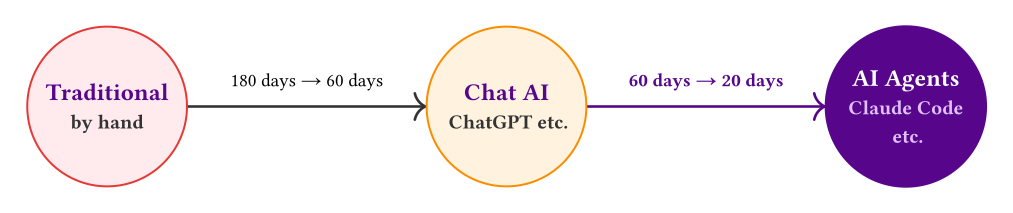
This is a story about efficiency

180 days Traditional research

60 days With a chatbot

20 days With AI agents

Benchmark: one high-quality study by one professor, who runs 2–3 projects at the same time.

The longer a project takes, the more an agent tends to matter.

No need to keep climbing
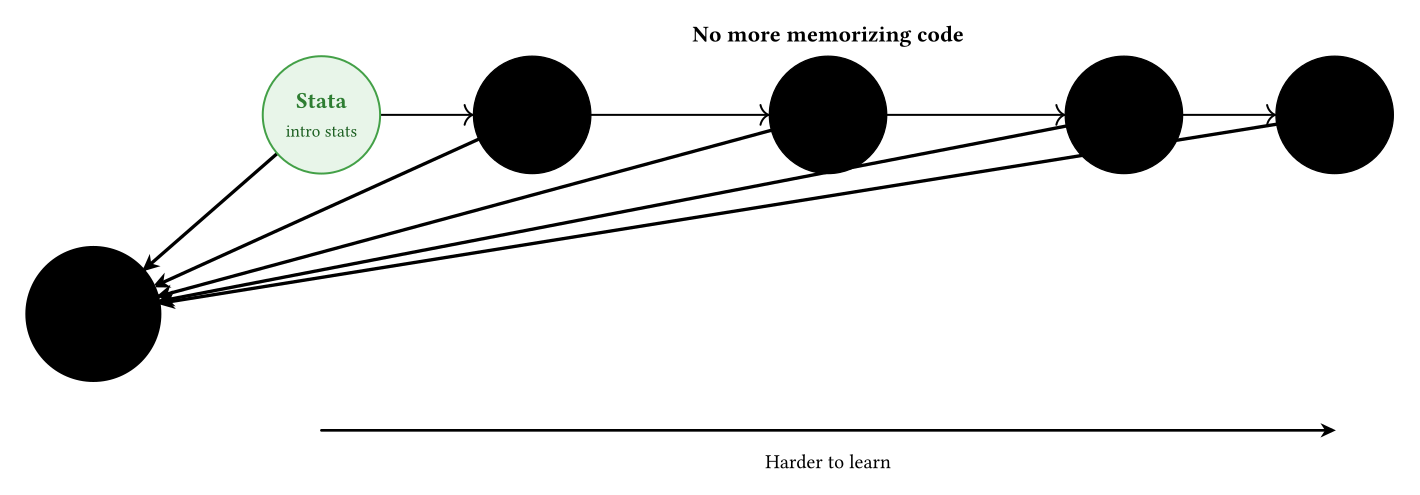
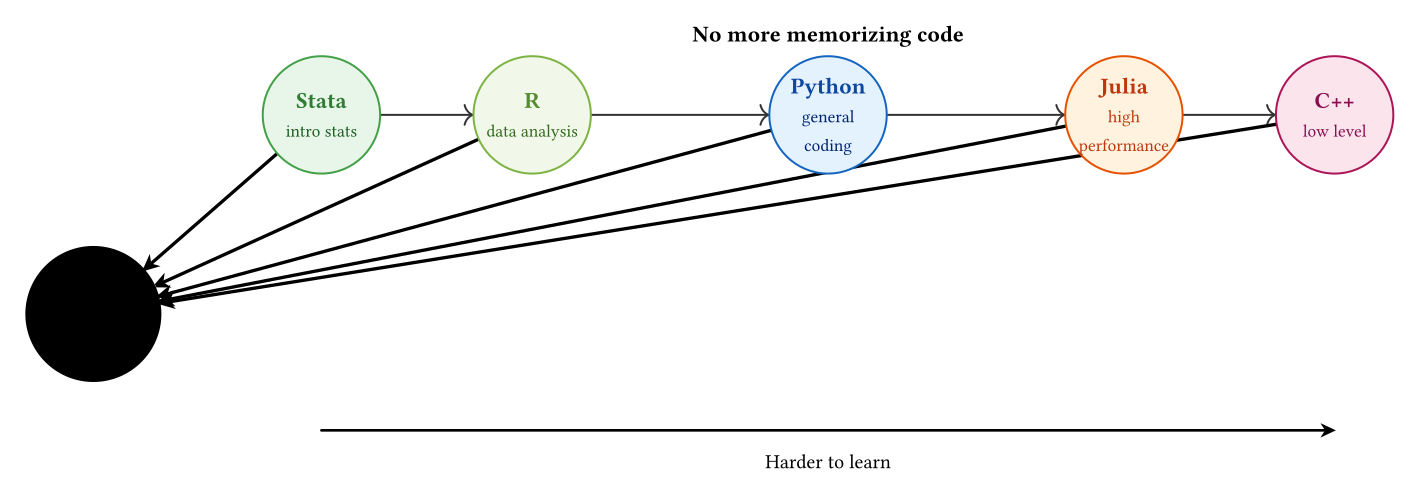
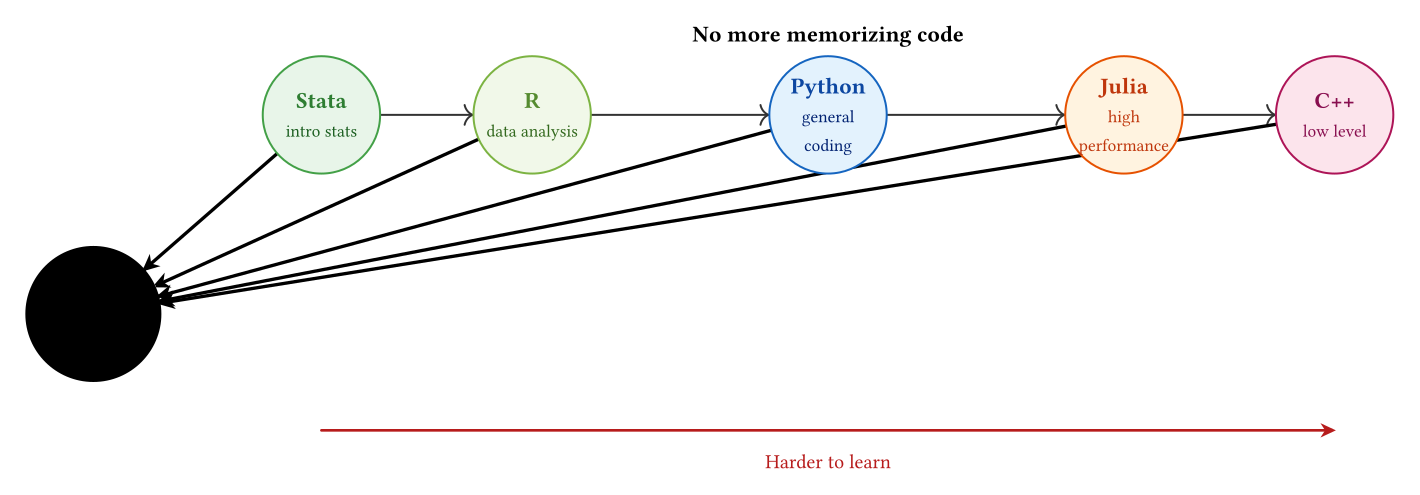
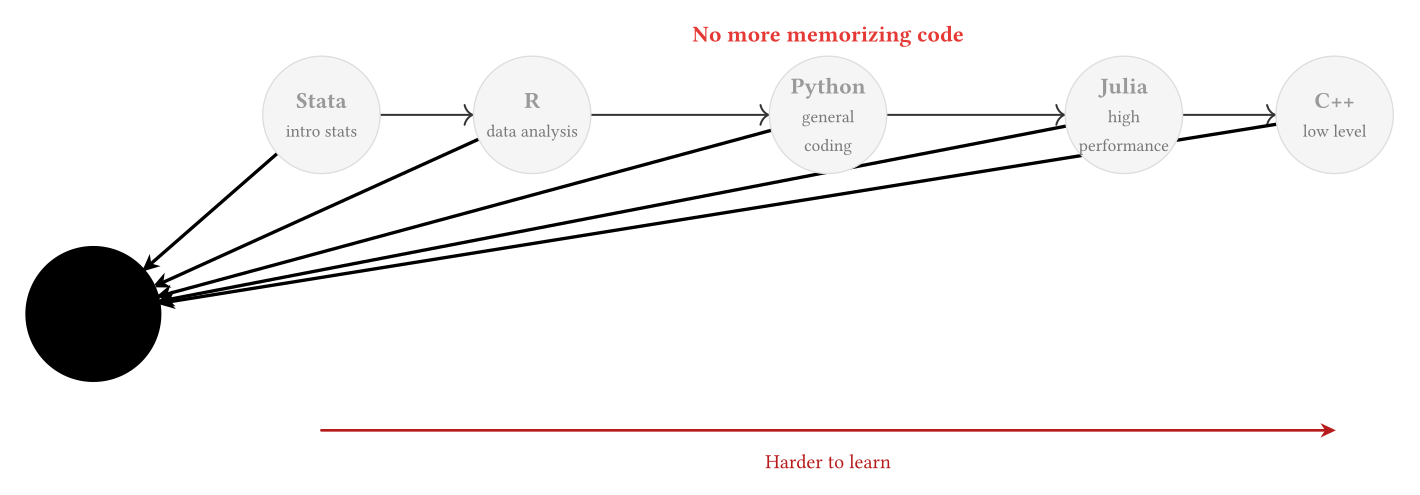
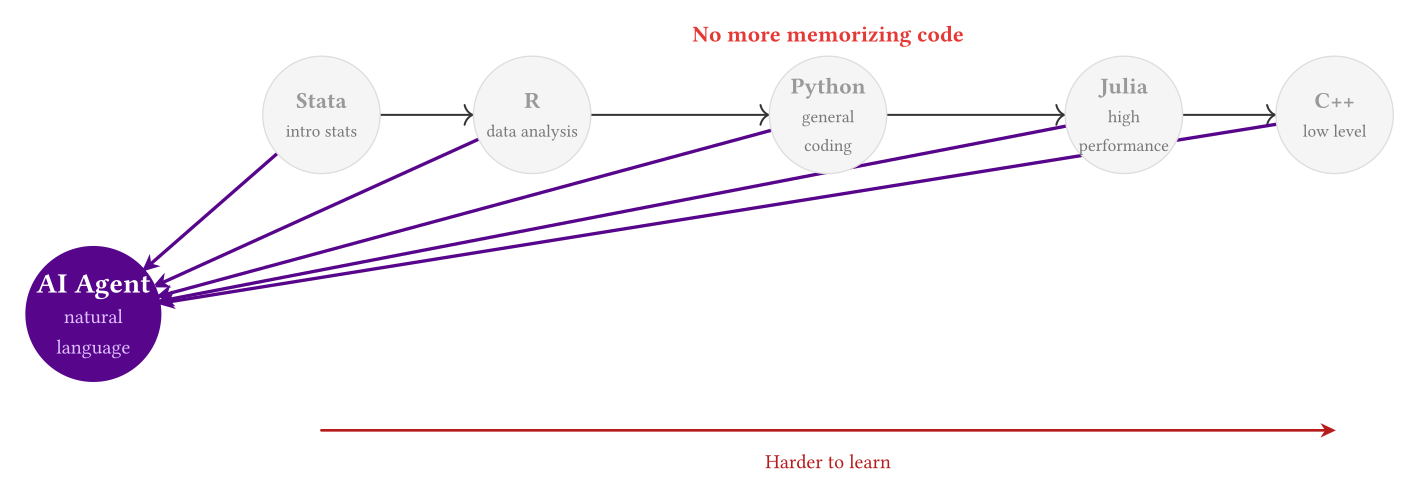
Agents run on computer skills, yet they are about to make most computer skills obsolete.

Meet the agent

A map of AI categories

🏢 AI labs

OpenAI
Anthropic
Google
DeepSeek
Moonshot

💬 Chatbots

ChatGPT
Claude
Gemini
DeepSeek
Kimi

🔧 AI apps

NotebookLM
Gamma
Elicit
Consensus
Notion AI

💻 IDEs

VS Code
Cursor
Windsurf
Antigravity
Zed

🤖 Terminal agents

Claude Code
Codex
Gemini CLI
OpenCode
Qwen Code

⚙️ Agent internals

Memory
Skill
Agent
Hook
MCP

Today’s focus: terminal agents, the most capable AI category right now. The internals on the right are the secret of their power.

Try it: what happens inside a Transformer?

Georgia Tech Polo Club · Transformer Explainer (needs internet) · If it won’t load, visit https://poloclub.github.io/transformer-explainer/

Pre-training vs. post-training

Base model · only continues text

Base Model
>▌

Chat model · actually answers

Chat Model
>▌

Ouyang et al. (2022). InstructGPT, NeurIPS · DeepSeek-AI (2025). DeepSeek-R1 · Raschka (2024). New LLM Pre-training and Post-training Paradigms

The terminal: texting your whole computer

Stata Command window

Type a command → act on the data

Stata/MP · Command
.▌
.▌
.▌

The terminal

Type a command → act on the whole computer

pwd where am I · ls what’s here · cd go there

Terminal
~ $▌
~/research $▌
~/research $▌
~/research/data $▌

These are Mac/Linux commands; Windows PowerShell is almost identical (ls and cd work in both).

CLI tools = command + arguments; press Enter and it runs

Most tools have no graphical interface, just a command name:

git · an undo button for your code

Terminal
~/research $▌
~/research $▌
~/research $▌
~/research $▌
~/research $▌

stata · run a do-file from the terminal, no GUI needed

Terminal
~/research $▌
~/research $▌
~/research $▌

The stata command must be on your PATH first (a one-time setup)

The AI tools you’ll use are just another command name like these.

Claude Code is just another terminal program

Terminal
~/research $▌
✻ Welcome to Claude Code · Opus 4.7
>▌
⏺ Let me check which variables are in the data first…
⏺ Bash(stata -b do check_vars.do) ✓
⏺ Found income, urban, age, educ, and more. Writing the script and running it…
⏺ Write(analysis.do) → Bash(stata -b do analysis.do) ✓
⏺ Urban households average $71,200 vs. $54,800 rural; regression table saved to results.md
>▌
⏺ Write(plot.do) → Bash(stata -b do plot.do) ✓
⏺ Chart saved as income_by_urban.png (urban–rural gap p < 0.001)

The only difference: you give orders in plain language.

Interface simplified; real versions differ slightly · Codex, Gemini CLI, and others work the same way: codex and gemini are each just a command name

What makes an agent different

The whole picture

It sees your scripts, data, and drafts at once. No more pasting snippets.

Self-debugging, end to end

It fixes bugs directly, with no hand-holding.

It doesn’t just answer questions; it gets the work done. Automate the grunt work and spend your time on the thinking.

How does an agent find what it needs?

An agent never loads the whole tree. It picks only the leaves it needs.
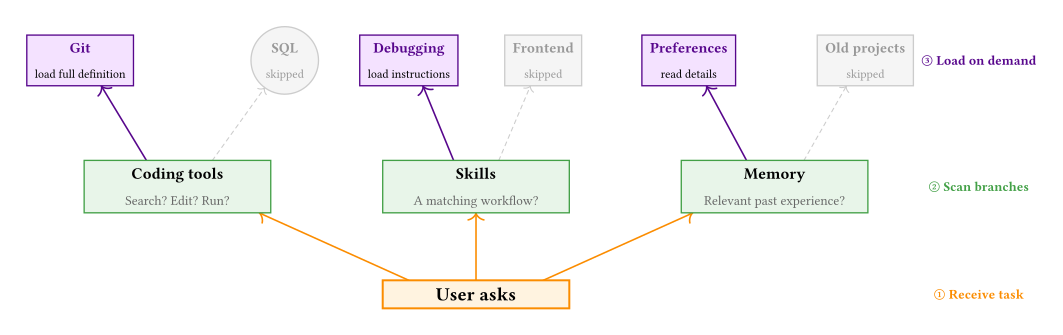
Purple = loaded, grey = skipped. The agent keeps only relevant knowledge in its “working memory”, which saves a lot of context.

How an agent works
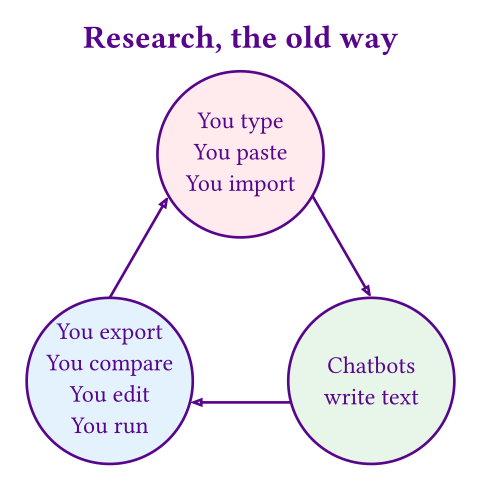
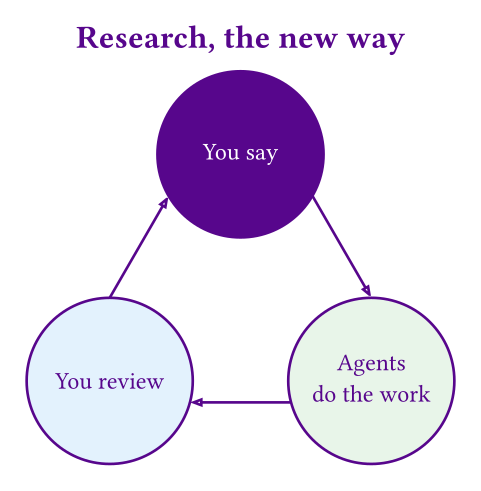
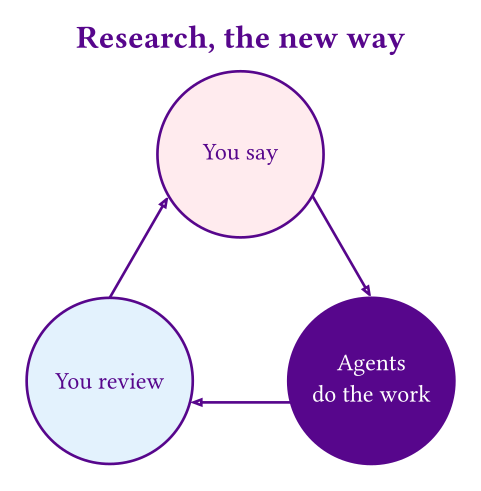
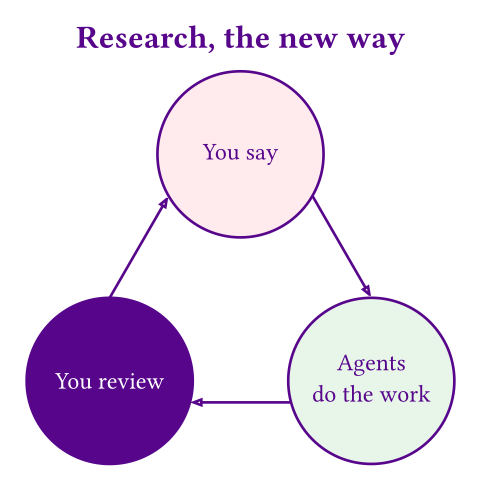
Say It, Done

Say it, done: literature review

You say:

Review the literature on Shanghai’s lane (lilong) neighborhoods.

What the agent does:

  1. Read the folder of PDFs
  2. Identify each study’s research design
  3. Extract key findings and data sources
  4. Sort by theme and year
  5. Build a literature matrix
  6. Draft the review
→

Output:

  • Literature matrix (Excel)
  • Reference list
  • Key findings per paper (detailed Word file)
  • Summary by category (short Word file)
  • First draft of the review

Time: < 5 minutes

Say it, done: data analysis

You say:

Report missing data by country and year in the World Bank indicators.

What the agent does:

  1. Read your data file
  2. Identify the country and year variables
  3. Compute missing rates for each group
  4. Write the code and make charts
  5. Produce summary tables and figures
  6. Assemble them in Quarto
  7. Export to Word, PDF, and HTML
→

Output:

  • Code
  • Figure files
  • Word document
  • PDF
  • HTML page

Time: < 10 minutes

Say it, done: your turn

Pick a research task and click “Let the agent try” to see how it plans. (Simulated locally; no internet needed.)

Task

    Say it, done: conference talk

    You say:

    Make a 15-slide deck.

    What the agent does:

    1. Read the paper draft for its core argument and structure
    2. Read the literature matrix and abstracts
    3. Read the figures and regression results
    4. Design the slide structure and narrative arc
    5. Write the slides in Typst
    6. Compile to PDF
    →

    Output:

    • Typst source (still editable)
    • Compiled PDF slides
    • Speaker notes for every slide
    • A first-draft script

    Time: < 15 minutes

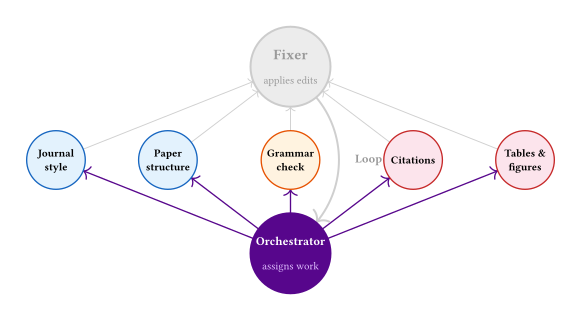
    Say it, done: polishing a paper

    You say: Polish this paper to ASR standards.
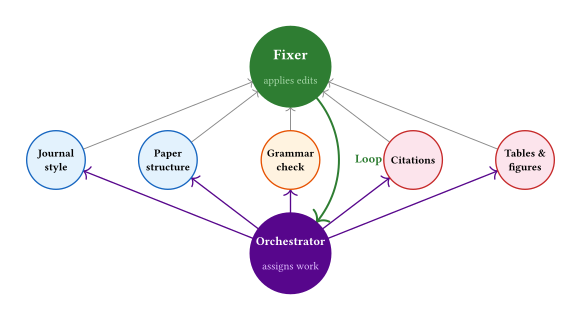
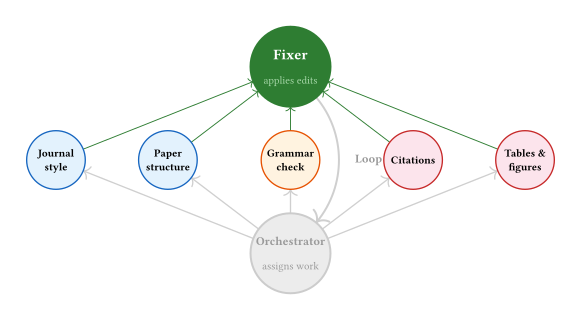
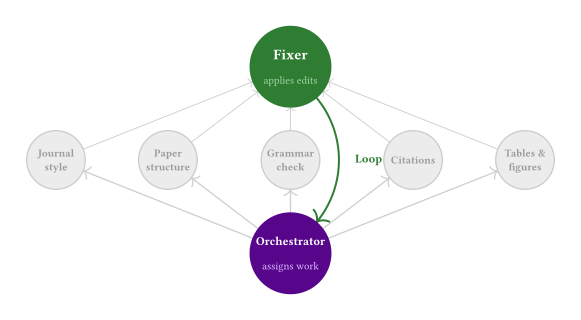
    5 reviewers in parallel: style · structure · grammar · citations · figures

    Output: revised paper + an edit log per round
    Time: < 30 minutes

    Acceleration and empowerment

    Prof. Chen writes a CSR paper in three days

    Scenario 1: acceleration. An experienced scholar + an agent = an empirical CSR paper on community governance in Shanghai, in three days.

    What Prof. Chen brings

    • Rising-star faculty at Shanghai University
    • Years of community research
    • Data and fieldwork materials
    • Fluent with agents
    • Three days

    The agent’s three roles

    • Day 1: data analyst
    • Day 2: literature assistant
    • Day 3: paper writer

    Three days, three jobs

    ① Day 1 · Data analysis

    The agent plays data analyst.

    • Clean the data ← fix errors, fill gaps
    • Analyze ← descriptives, regressions
    • Report ← tables, figures, interpretation

    ② Day 2 · Literature review

    The agent plays literature assistant.

    • Search the literature ← titles and DOIs
    • Fetch PDFs in bulk ← via library access / Zotero
    • Synthesize ← summaries, review draft

    ③ Day 3 · First draft

    The agent plays paper writer.

    • Core arguments ← distilled from the review
    • Core results ← distilled from the analysis
    • Full draft ← in CSR structure

    Prof. Chen reviews the output and steers the direction (the harness); the agent does all the execution.

    A high schooler writes an ASR introduction

    Scenario 2: empowerment. A tech-savvy science student who isn’t a native English speaker can still write an ASR-quality introduction.

    In principle, the rhythm, tone, style, and voice of academic writing can all be learned from published papers.

    The traditional path

    Grad school → years of reading → find your own style → competence, eventually

    The agent path

    Download papers → agent learns the style → generate candidates → synthesize the best version

    Three phases: learn · execute · teach

    ① Learn

    The human sets the direction; the agent builds the knowledge base.

    • Build a corpus ← 100+ recent ASR papers
    • Pick a topic ← e.g. “A century of educational inequality in the U.S.”
    • Model the style ← agent extracts rhythm and argument logic

    ② Execute

    Generate in bulk · filter · synthesize the best introduction.

    • Generate ← 100 introductions, one per template paper
    • Review ← another agent picks the 20 strongest
    • Synthesize ← a final agent condenses them into one

    ③ Teach

    The AI becomes a tutor: it explains why it’s written this way.

    • Line by line ← each paragraph’s strategy, in the student’s own language
    • Language ← key academic terms and phrasings
    • Next steps ← a personalized reading list

    The result: a student with no sociology training can see what makes this introduction good.

    Two ideal types

    Dimension Acceleration Empowerment
    User Advisor (expert) Student (novice)
    Agent’s role A student who does the work An advisor who does the work
    Core mechanism Delegating repetitive work Learn, execute, teach
    Human contribution Direction + quality control Direction
    Agent contribution A tireless workhorse A stroke of genius
    Best-case output A paper in three days An ASR introduction

    Advisors save time; students gain knowledge.
    Perhaps one day the roles of advisor and student will both fade.

    Capabilities and limits

    What are agents good at?

    Area Rating Concrete tasks
    Computation and code ★★★★★ Organizing files, cleaning data, building variables, running regressions, replication, figures
    Structured knowledge ★★★★★ Literature screening, organizing materials, codebooks, abstracts, findings, drafting methods and appendices
    Research design and framing ★★★★★ Can help sharpen questions and propose structure and identification strategies, but the researcher must sign off
    Theory and contribution ★★★★★ Can help summarize possible contributions, position the work, and spot logical gaps, but cannot replace expert judgment
    Surveys, interviews, fieldwork ★★★★★ Researchers on site, building rapport

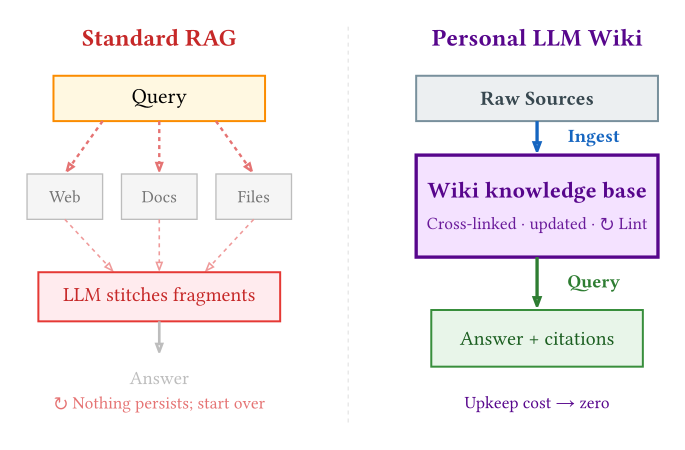
    Your personal Wikipedia

    Let the agent keep improving your knowledge base; it gets smarter the more you use it.
    See: karpathy/llm-wiki

    Four quadrants of research
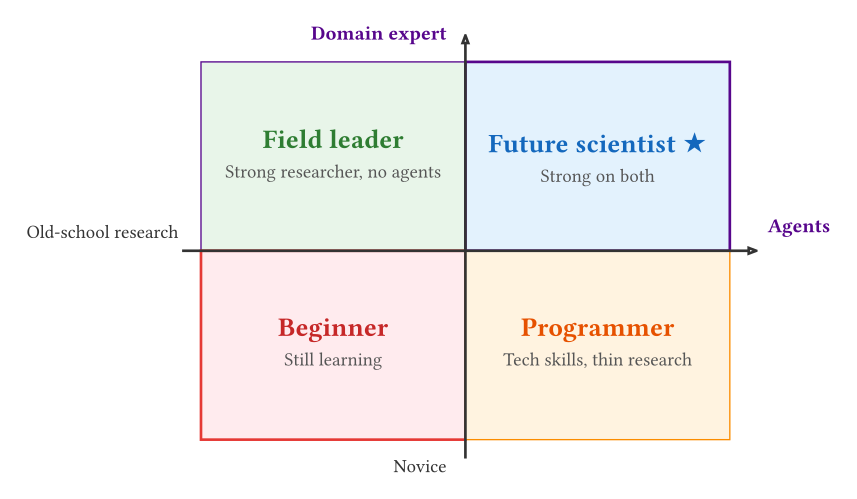
    Four kinds of capital for the future

    CORE

    ① Social interaction

    Political capital + social capital

    CORE

    ② Data and materials

    Material capital

    MUST-HAVE

    ③ The disciplinary frontier

    Cultural capital

    MUST-HAVE

    ④ Steering agents

    Know-how

    A mirror from history

    From the “car industry” to the “car society”: urban space, marriage and family, car culture, geopolitics. (Lü Peng, June 8, 2026; in Chinese)

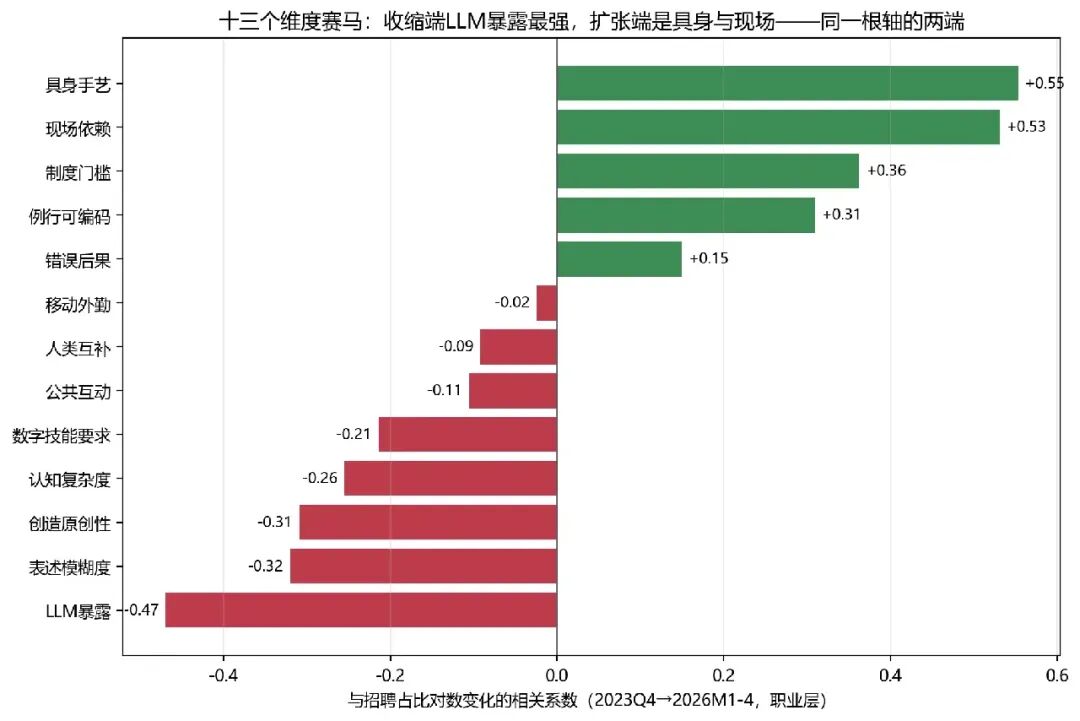
    AI exposure ≠ job loss

    Embodied craft and on-site work are key skills for the new era. (ShanghaiTech CEISD et al., July 21, 2026; in Chinese)

    Skills on the move

    From handwriting to brain–computer interfaces

    Handwriting

    Cursive is fading

    →

    Typing

    Keyboard / autocorrect

    →

    Voice

    Dictation

    →

    Brain–computer interface

    Reading neural signals

    One task, four ways to input it.
    Are these skills becoming obsolete?

    Why do we still watch humans play chess?

    Chess engines left humans behind long ago (Deep Blue in 1997; AlphaZero and Stockfish dominating since 2017). Yet since 2020, the number of people watching and playing human chess has exploded.

    If machines are so much better, why do we still watch people play?

    We watch for the uncertainty

    The thrill of sport is that nobody knows the outcome. No one wants to watch a guaranteed flawless win.

    We identify with people who can lose

    People blunder, choke, and show courage. A machine can’t lose, so there’s nothing to identify with.

    Sport, art, and competition are stages where we watch how people stay human under pressure.
    Difficulty and mistakes aren’t flaws; they’re how our humanity shows.

    Technology doesn’t delete skills; it moves them

    Skill shift What happens to people What it means with AI Examples
    Fading Drops out of daily use, or becomes a hobby Largely replaced by AI Abacus arithmetic, slide rules, penmanship, wilderness survival
    Coexisting Both persist, each with its own role AI creates new forms; the live human still has value Track and field, dance, live concerts, home cooking
    Upgraded (accelerated / empowered) Experts get faster, novices get stronger The bar drops, execution is outsourced, humans steer Translation, Go, photography, design, coding, research
    Newly born New technology creates new demand AI creates new jobs and occupations Drivers, typists, AI trainers

    The combine harvester

    The harvester story

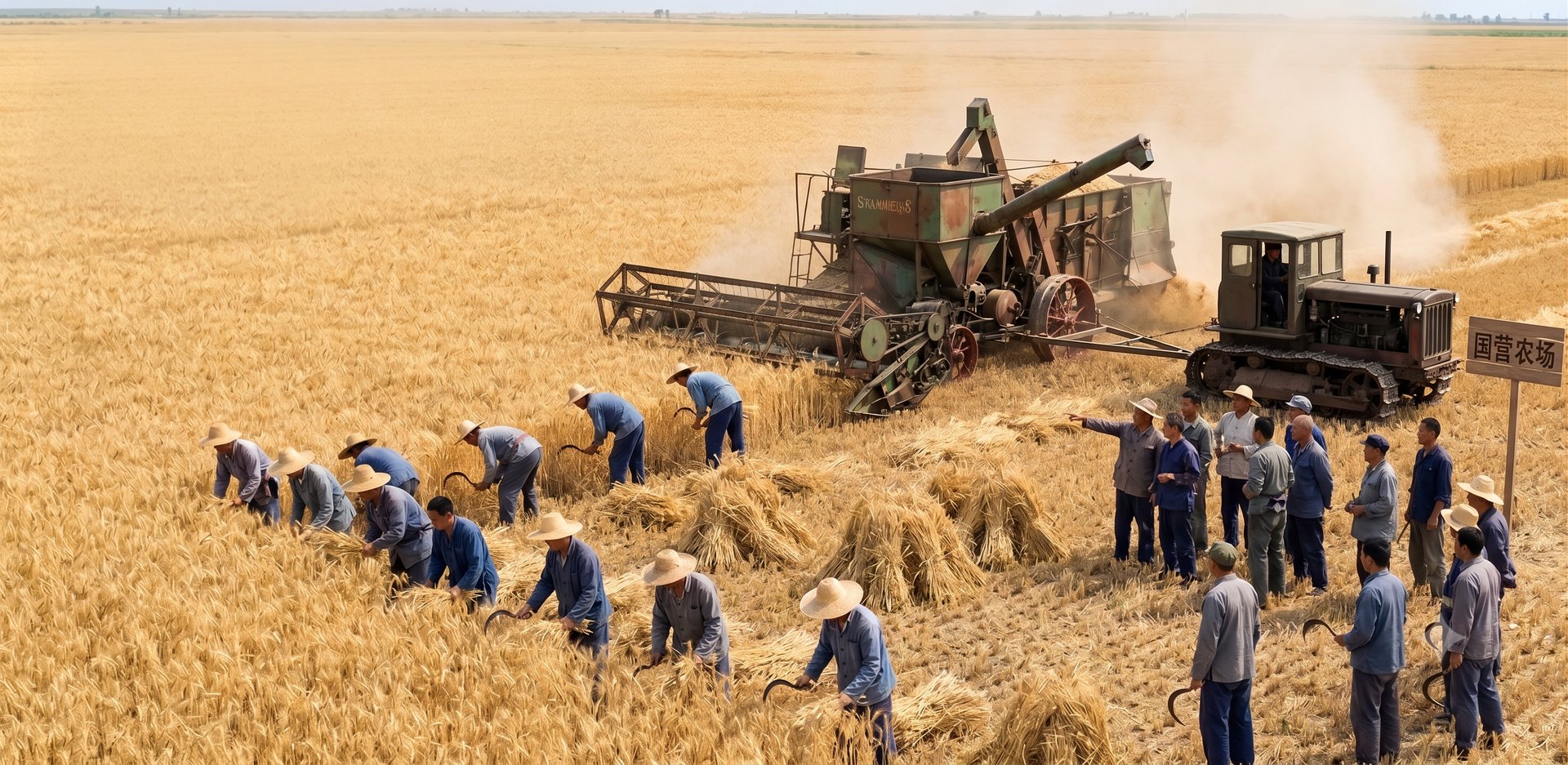
    Heilongjiang, northeast China, 1956. You’re cutting wheat with your village’s farming team. One sickle, about a sixth of an acre a day.

    One day, the state farm next door brings in a machine: a Soviet-built “Stalinets-6” combine harvester. It roars across the field and easily harvests 65 acres in a single day.

    The villagers gather round and stare for a long time.
    Someone says, “That thing costs a fortune. We could never afford it.”
    Someone else says, “A machine’s not as steady as a hand. If it ruins the crop, who’s to blame?”
    And some just stay silent, gripping their sickles a little tighter.

    Harvester = AI agent  Sickle = traditional methods  Grain = your research

    Five kinds of resistance

    ① “I don’t need a harvester”

    AI won’t touch my field.

    But every discipline has grunt work.

    ② “Harvesters are too expensive”

    The sickle is cheap and good enough.

    But time is the biggest cost of all.

    ③ “I’ll never learn to drive one”

    New tech feels daunting; the sickle feels safer.

    But the learning curve is flattening fast.

    ④ “Who’s to blame if it ruins the crop?”

    Misused AI: hallucinations, leaks, logic gaps.

    Fair, but learn to drive; don’t smash the machine.

    ⑤ “The big farms will put us out of work”

    Fear that AI deepens inequality.

    Fair, but not using it ≠ not being affected.

    Three kinds of overoptimism

    Owning a harvester doesn’t guarantee a harvest:

    ①

    First, you need a field

    You need a research question and data.

    ②

    You need to know the seasons

    Research judgment can’t be outsourced.
    When to explore and when to converge is your call.

    ③

    Every field is different

    Your data, methods, and writing style are your own.
    Tailor the agent’s setup to your research.

    AutoResearch: five levels of autonomy in research
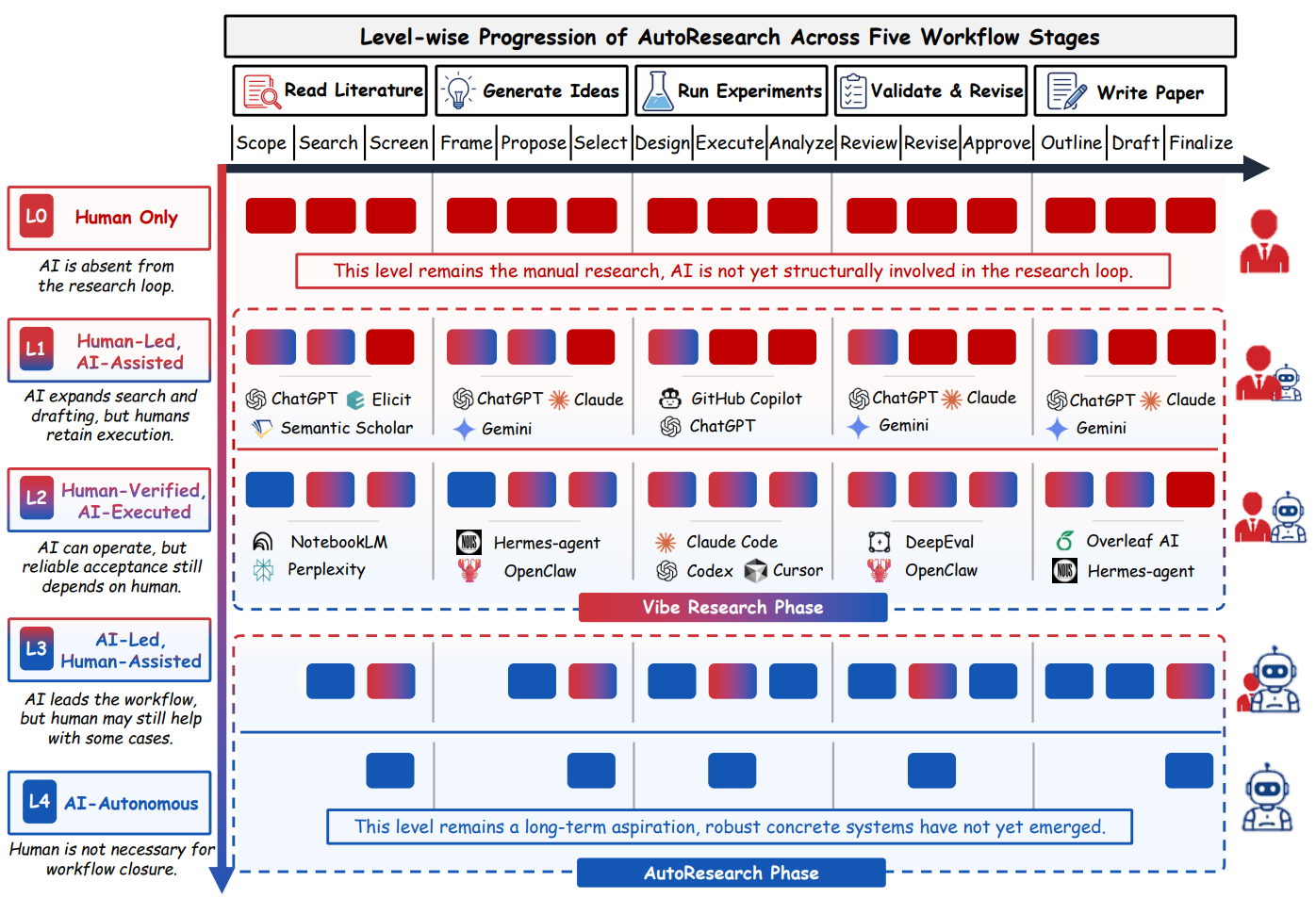
    Source: Tie et al., working paper · arXiv:2605.23204

    Getting started

    Using an agent

    Level 1: system setup

    Install the tools and prepare your environment.

    • Install Git (check “Add to PATH”)
    • Install VS Code (check “Add to PATH”)
    • Install the Claude Code or Codex extension in VS Code

    One-time job. About 20 minutes.

    Level 2: task setup

    Tell the agent how to think about your research:

    • How to frame research questions
    • How to handle literature reviews
    • How to construct variables
    • Which methods to use
    • How to format tables and figures
    • Your writing style

    A one-time investment that pays off in every project.

    Compounding returns: set up once, benefit for years

    The core principle:

    Any repetitive task only needs explaining once.
    Any similar setup only needs designing once.

    Example 1

    Set up “how to handle PSID data” once, and every new project inherits it.

    Example 2

    Write “model literature reviews on [a paper]” once, and the agent follows it every time.

    The first project is the hardest to set up; every one after is easier.
    That’s compounding, not linear growth.

    A sample project configuration

    The core of a CLAUDE.md configuration file:

    # Research project setup
    
    ## Data processing rules
    - Always use Stata for data cleaning
    - Variable construction: follow the coding scheme in @Zhang-Miao-2025.pdf
    
    ## Output format
    - Regression tables: use esttab
    - Figures: white background, 7×5 inches
    - Citations: American Sociological Review style
    ## Project structure
    data/raw/     ← raw data (read-only)
    data/clean/   ← cleaned data
    do-file/      ← analysis scripts
    output/       ← figures and results

    Break big tasks into small ones

    When the AI’s work disappoints, it usually means the task was too big and needs splitting.
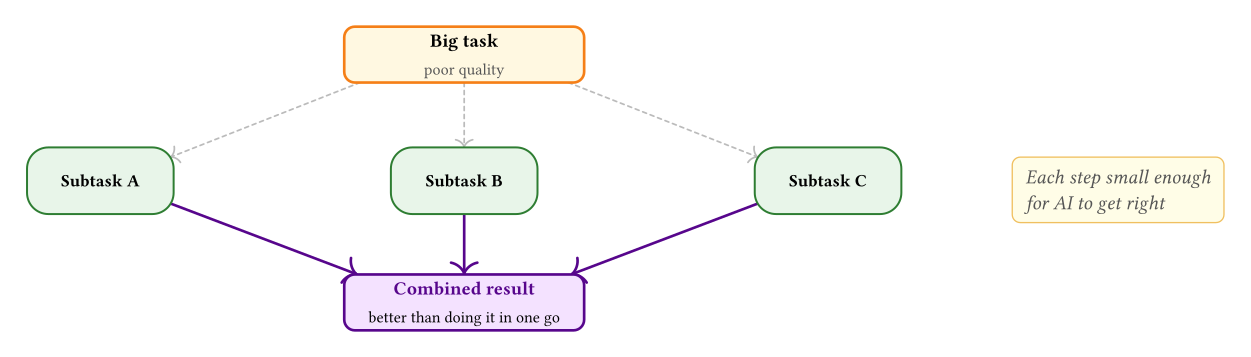
    Steering the agent

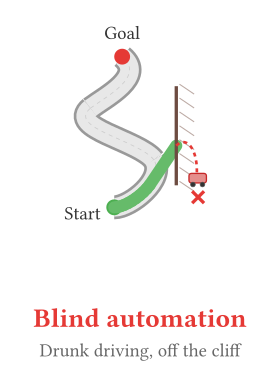
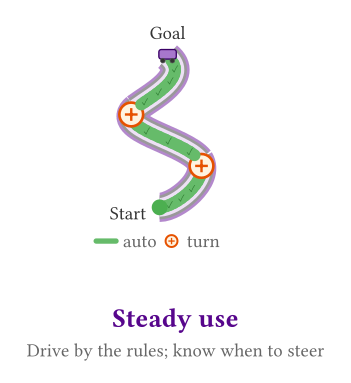
    The road has curves. Floor it in a straight line and you’ll crash.
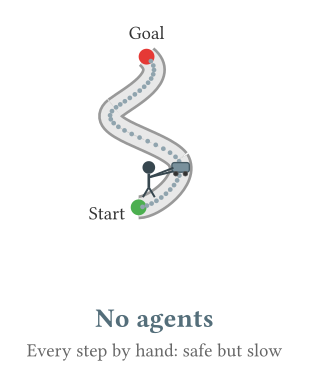
    A crisis for social science

    The stronger the tools, the harder we must guard the researcher’s judgment:

    Contamination at the source

    As Nature reported (2026):

    • Up to 45% of survey responses may be LLM-generated

    Stronger individuals, narrower science

    A Nature study also found:

    • Collective topic diversity fell 4.6%
    • Attention concentrates on a few “star problems”

    Don’t floor it in a straight line: pick a destination, turn on navigation, and drive safely.

    Hao et al. (2026). Nature. · Adam, D. (2026, June 2). Nature.

    How an agent runs

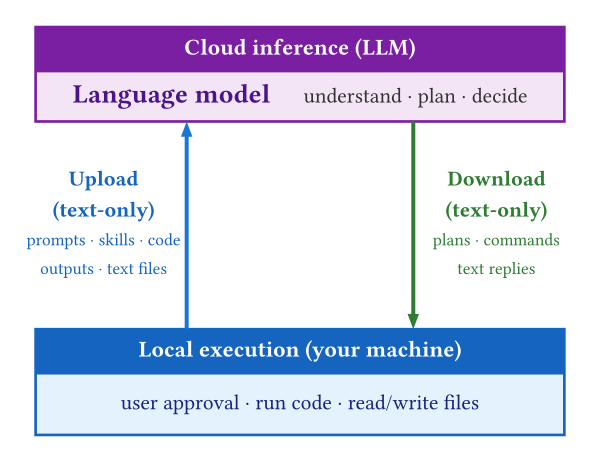
    An agent’s native language: plain text

    Agents can only read and write text, so file format determines compatibility.

    Works natively ✓

    The agent reads and writes these directly:

    • .do / .R / .py – analysis scripts
    • .md / .qmd / .tex – writing and slides
    • .csv / .json – data
    • .bib – references
    • Git repositories, config files

    Needs a bridge ⚠

    Other formats must be bridged, parsed, or converted first:

    • Word .docx
    • PowerPoint .pptx
    • Excel .xlsx
    • PDF
    • .dta / .rds and other binary data

    Working with Word documents

    Original Word → Markdown → agent edits → Markdown → Word, but the loop doesn’t close.
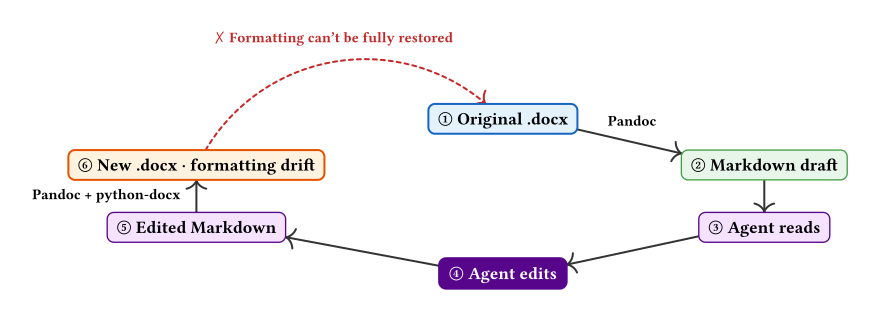
    ✓ Kept

    Body text, heading levels, tables, citations, lists

    ✗ Lost

    Track changes, comments, custom styles, fonts, headers and footers

    The rule: work in plain text and convert at the end. Accept some drift; save your attention for content.

    A cleaner route: edit the XML directly

    A .docx is a ZIP of XML. The docx skill edits that XML directly, so the loop closes.
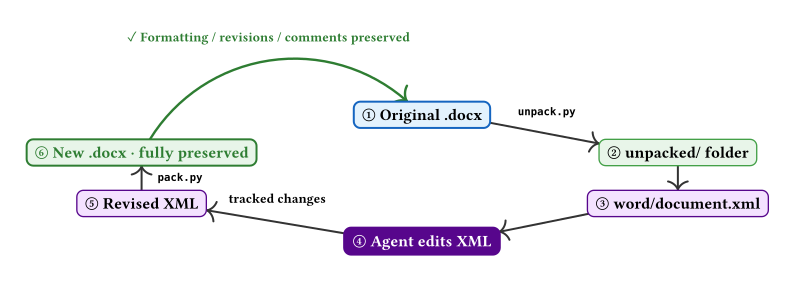
    Item Markdown route XML route
    Content (text, tables, headings, citations) ✗ Lost ✓ Kept
    Formatting (styles, fonts, headers and footers) ✗ Lost ✓ Kept
    Track changes and comments ✗ Lost ✓ Kept

    Choosing a tool

    Which tool should you pick?

    Claude Cowork Claude Code Codex Gemini CLI
    Provider Anthropic Anthropic OpenAI Google
    Core model Claude Claude (Opus / Sonnet) GPT / Codex Gemini
    Interface Desktop app Terminal + IDE + desktop Terminal + IDE + app Terminal + IDE
    Entry price Claude Pro ~$20/mo Claude Pro ~$20/mo Limited free; Plus ~$20/mo Limited free; AI Pro ~$20/mo
    Best at Office files, no coding Research projects, large codebases All platforms, generous Plus limits Long context, Google ecosystem

    All four work the same way: you ask in plain language, so switching tools doesn’t cost you the skills you’ve learned.

    Work agents vs. code agents

    Same core, two forms. Both run code, handle local files, search the web, and carry out multi-step tasks.

    Code agents · programming depth

    • Whole-project view: knows structure and dependencies
    • Direct edits: changes files, runs the shell and tests
    • Parallel subagents: explore / plan / code
    • Hooks and skills: automated checks, reusable workflows
    • MCP: connects external tools and data

    Work agents · office automation

    • Office files: PowerPoint / Excel / Word
    • Scheduled tasks: daily briefs, recurring jobs
    • Browser use: navigates sites like a person
    • Connectors: email, calendar, cloud drives
    • Low barrier: built for everyday office work

    For coding and research, use a code agent; for documents and reports, use a work agent.

    Which one fits you?

    Answer the first two questions to get a live recommendation and a runner-up.

    1. Main task?
    2. Budget?
    3. Preferred interface? (optional)
    Answer the questions above to see which tool fits you best.

    Questions and discussion

    The AI is fast. You are the one who knows what matters.

    Thank you!

    Minghong Shen
    mhshen@sas.upenn.edu

    Slides:
    https://www.socimh.com/slides.html
    Hands-on guide (in Chinese):
    socimh.com/cc-guide/

    Appendix

    The limits of agents

    Knowledge cutoff

    It can’t see the latest research: newly published papers and recent developments may be unknown to it.

    Fix: you supply the latest literature; the agent integrates it.

    Context window limits

    Limited context means it can’t hold a very large knowledge structure in view, or process a huge dataset in one pass.

    Fix: work in chunks; keep your setup modular.

    Agents don’t replace professional expertise. They are your execution layer; you remain the owner of the research.

    When a famous advisor becomes a skill

    Zhang Xuefeng’s “cognitive operating system”

    Zhang Xuefeng: China’s best-known and most controversial college-admissions advisor, followed by tens of millions.

    Five mental models

    • Choice beats effort
    • Society is a sieve
    • Work backward from the job market
    • Class realism
    • Controversy is reach

    Data foundation

    • 5 books
    • 15+ major media interviews
    • 30+ first-hand quotes
    • 8 decision heuristics
    • A full life timeline

    What will agents mean for white-collar work?

    It depends on:

    1. How much of the work in this occupation can AI accelerate or empower?

    2. Can the occupation’s scope expand, or is it stuck in zero-sum competition?

    3. How high are the barriers to entry?

    Is AI narrowing science?

    A Nature bibliometric study used an ML classifier on 41M+ papers (1980–2025, six fields) and flagged 310,000 that clearly used AI. The ledger cuts both ways:

    The individual ledger: a win

    • Scientists who use AI: 3× the papers, nearly 5× the citations
    • Junior scientists leave academia less often and become PIs sooner

    The collective ledger: a loss

    • Topic coverage 4.6% narrower
    • Papers building on each other down 22%, all orbiting AlphaFold-style “star studies”

    “We’re like pack animals.” (Evans) Using AI is a personal moat; but when everyone climbs the same mountain, vast territory goes unexplored.

    Evans & Xu team (Nature) · Science news coverage: Zhao, C. (2026-01-22). Science 391(6783). DOI: 10.1126/science.aef6710

    The evidence: more than a hunch

    Large-scale studies point the same way

    Individuals · adopters pull ahead

    Researchers who use AI

    • About 3× the publications
    • About 4.8× the citations
    • Full-population evidence from 41.3M papers

    The same study also finds collective topic diversity down 4.6%

    Who gains most · novices

    Generative AI for knowledge work

    • +14% productivity on average
    • +30–35% for novices and less-skilled workers
    • A field experiment with 5,172 support agents

    The less skilled you are, the bigger the gain: hard evidence for “empowerment”

    Hao et al. (2026). Nature. · Brynjolfsson, Li & Raymond (2025). Quarterly Journal of Economics.